> ## Documentation Index
> Fetch the complete documentation index at: https://docs-staging-feat-docs-5540.mintlify.site/llms.txt
> Use this file to discover all available pages before exploring further.

> Configure an update policy form using Forms for Actions

# Use Cases: Configure an update policy form using Forms

<Card title="Before you start">
  1. Create a [Machine-to-Machine Application](/docs/get-started/auth0-overview/create-applications/machine-to-machine-apps) with the following scopes enabled:

  * `read:users`
  * `update:users`
  * `create:users`
  * `read:users_app_metadata`
  * `update:users_app_metadata`
  * `create:users_app_metadata`

  2. Add a [Vault connection](/docs/customize/forms/vault) using the M2M application credentials.
</Card>

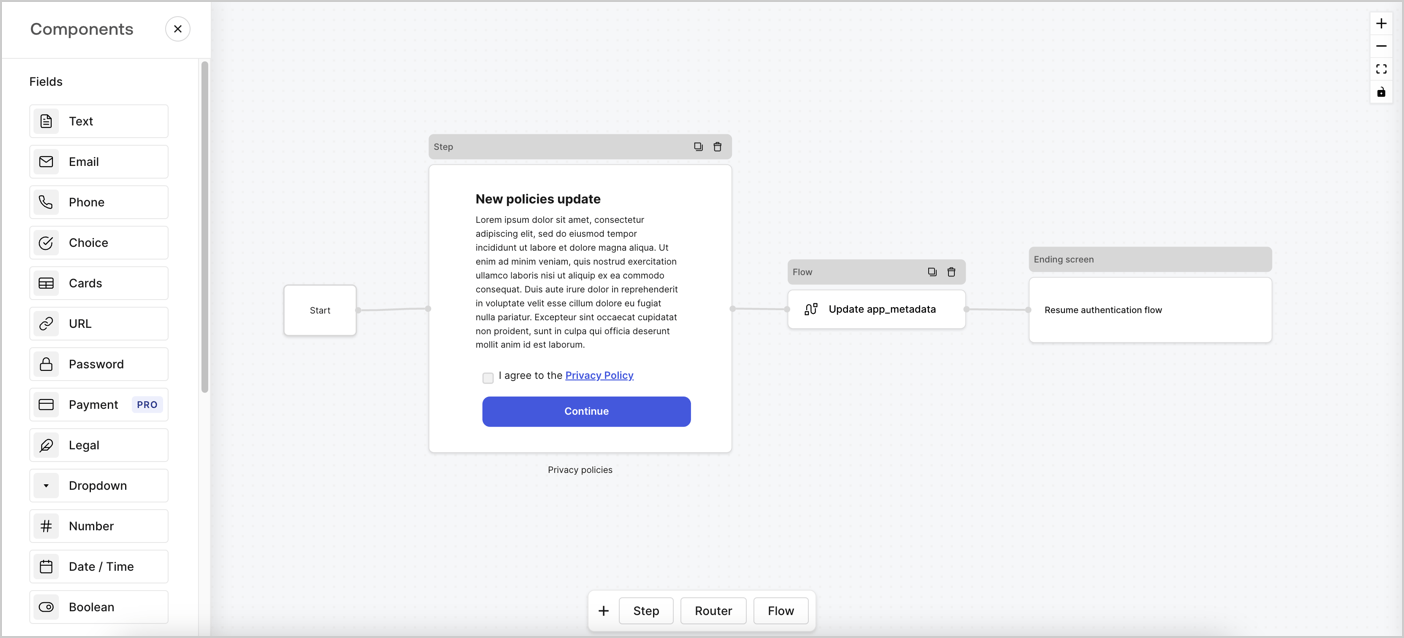
Forms for Actions allows you to create custom privacy policies flows and store the consent under the `app_metadata` object.
<Frame>
  <img src="https://mintcdn.com/docs-staging-feat-docs-5540/oQyORW-_D7zcVjVj/docs/images/cdy7uua7fh8z/6i68dMvHDTijfRmSgN1x8Q/ad900e7d4c0fb34645921435472b8684/privavy-policy-form.png?fit=max&auto=format&n=oQyORW-_D7zcVjVj&q=85&s=7e27e7ad349aa2e476010fc8a493dfe9" alt="Dashboard > Actions > Forms > Privacy policy use case" data-og-width="1404" width="1404" data-og-height="638" height="638" data-path="docs/images/cdy7uua7fh8z/6i68dMvHDTijfRmSgN1x8Q/ad900e7d4c0fb34645921435472b8684/privavy-policy-form.png" data-optimize="true" data-opv="3" srcset="https://mintcdn.com/docs-staging-feat-docs-5540/oQyORW-_D7zcVjVj/docs/images/cdy7uua7fh8z/6i68dMvHDTijfRmSgN1x8Q/ad900e7d4c0fb34645921435472b8684/privavy-policy-form.png?w=280&fit=max&auto=format&n=oQyORW-_D7zcVjVj&q=85&s=d599116f7e759adcf145e80d92647206 280w, https://mintcdn.com/docs-staging-feat-docs-5540/oQyORW-_D7zcVjVj/docs/images/cdy7uua7fh8z/6i68dMvHDTijfRmSgN1x8Q/ad900e7d4c0fb34645921435472b8684/privavy-policy-form.png?w=560&fit=max&auto=format&n=oQyORW-_D7zcVjVj&q=85&s=509c813437bc8d6b659b79801953daa1 560w, https://mintcdn.com/docs-staging-feat-docs-5540/oQyORW-_D7zcVjVj/docs/images/cdy7uua7fh8z/6i68dMvHDTijfRmSgN1x8Q/ad900e7d4c0fb34645921435472b8684/privavy-policy-form.png?w=840&fit=max&auto=format&n=oQyORW-_D7zcVjVj&q=85&s=7fe6ef92fed3a556574cc659fdc105dd 840w, https://mintcdn.com/docs-staging-feat-docs-5540/oQyORW-_D7zcVjVj/docs/images/cdy7uua7fh8z/6i68dMvHDTijfRmSgN1x8Q/ad900e7d4c0fb34645921435472b8684/privavy-policy-form.png?w=1100&fit=max&auto=format&n=oQyORW-_D7zcVjVj&q=85&s=043519f6c7ea8cdd5467fb09c6b3e4f7 1100w, https://mintcdn.com/docs-staging-feat-docs-5540/oQyORW-_D7zcVjVj/docs/images/cdy7uua7fh8z/6i68dMvHDTijfRmSgN1x8Q/ad900e7d4c0fb34645921435472b8684/privavy-policy-form.png?w=1650&fit=max&auto=format&n=oQyORW-_D7zcVjVj&q=85&s=4387b6b2fdf5b9826119f4bf82b3f1f9 1650w, https://mintcdn.com/docs-staging-feat-docs-5540/oQyORW-_D7zcVjVj/docs/images/cdy7uua7fh8z/6i68dMvHDTijfRmSgN1x8Q/ad900e7d4c0fb34645921435472b8684/privavy-policy-form.png?w=2500&fit=max&auto=format&n=oQyORW-_D7zcVjVj&q=85&s=cf62f8b17e1085ba385d324668cc0c14 2500w" />
</Frame>

The sections below outline how you can create an Update Policy form using nodes and flows, along with steps for adding your form to a [Post Login](/docs/customize/actions/explore-triggers/signup-and-login-triggers/login-trigger) Action.

## Create a form from scratch

Follow these steps to create a form to gather information:

1. Open the Form editor by selecting **Auth0 Dashboard > Actions > Forms.**
2. Select **Create Form** > **Start from scratch**.

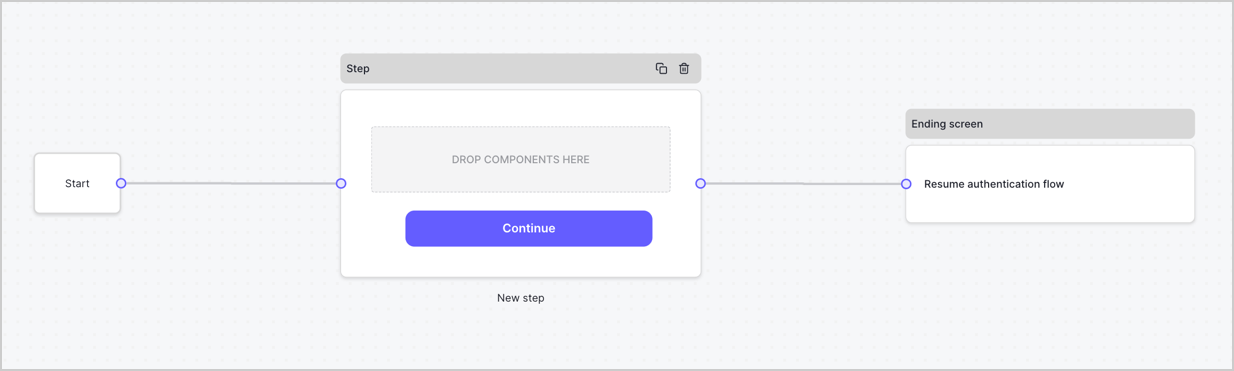
By default, a new form contains a Start node, a Step node, and an Ending screen node.
<Frame>
  <img src="https://mintcdn.com/docs-staging-feat-docs-5540/5PZMvu_olU467vq_/docs/images/cdy7uua7fh8z/2TZ9jSjgEcARFpULI6hz4R/a4319a1bd482f2ee5cc23100fdb2f42c/New-form-Forms-for-action-use-case.png?fit=max&auto=format&n=5PZMvu_olU467vq_&q=85&s=301b013b1fe43f2e6cfbda7dc48ab5df" alt="Dashboard > Forms > Use Cases > Form" data-og-width="1234" width="1234" data-og-height="371" height="371" data-path="docs/images/cdy7uua7fh8z/2TZ9jSjgEcARFpULI6hz4R/a4319a1bd482f2ee5cc23100fdb2f42c/New-form-Forms-for-action-use-case.png" data-optimize="true" data-opv="3" srcset="https://mintcdn.com/docs-staging-feat-docs-5540/5PZMvu_olU467vq_/docs/images/cdy7uua7fh8z/2TZ9jSjgEcARFpULI6hz4R/a4319a1bd482f2ee5cc23100fdb2f42c/New-form-Forms-for-action-use-case.png?w=280&fit=max&auto=format&n=5PZMvu_olU467vq_&q=85&s=1ccbcd9e367b288887578a73cf0604a0 280w, https://mintcdn.com/docs-staging-feat-docs-5540/5PZMvu_olU467vq_/docs/images/cdy7uua7fh8z/2TZ9jSjgEcARFpULI6hz4R/a4319a1bd482f2ee5cc23100fdb2f42c/New-form-Forms-for-action-use-case.png?w=560&fit=max&auto=format&n=5PZMvu_olU467vq_&q=85&s=f93afbac2de0d1ff77c868dde63f2a4e 560w, https://mintcdn.com/docs-staging-feat-docs-5540/5PZMvu_olU467vq_/docs/images/cdy7uua7fh8z/2TZ9jSjgEcARFpULI6hz4R/a4319a1bd482f2ee5cc23100fdb2f42c/New-form-Forms-for-action-use-case.png?w=840&fit=max&auto=format&n=5PZMvu_olU467vq_&q=85&s=82868253fb54ad2805c4920f9d03693b 840w, https://mintcdn.com/docs-staging-feat-docs-5540/5PZMvu_olU467vq_/docs/images/cdy7uua7fh8z/2TZ9jSjgEcARFpULI6hz4R/a4319a1bd482f2ee5cc23100fdb2f42c/New-form-Forms-for-action-use-case.png?w=1100&fit=max&auto=format&n=5PZMvu_olU467vq_&q=85&s=6b40f0527922ac2c5810865cb6a47cc0 1100w, https://mintcdn.com/docs-staging-feat-docs-5540/5PZMvu_olU467vq_/docs/images/cdy7uua7fh8z/2TZ9jSjgEcARFpULI6hz4R/a4319a1bd482f2ee5cc23100fdb2f42c/New-form-Forms-for-action-use-case.png?w=1650&fit=max&auto=format&n=5PZMvu_olU467vq_&q=85&s=49d1301b878d0e5d0f33f29105de9182 1650w, https://mintcdn.com/docs-staging-feat-docs-5540/5PZMvu_olU467vq_/docs/images/cdy7uua7fh8z/2TZ9jSjgEcARFpULI6hz4R/a4319a1bd482f2ee5cc23100fdb2f42c/New-form-Forms-for-action-use-case.png?w=2500&fit=max&auto=format&n=5PZMvu_olU467vq_&q=85&s=a00881b29b554a10dcd2b33eb8e1afc0 2500w" />
</Frame>

### Configure the Step node

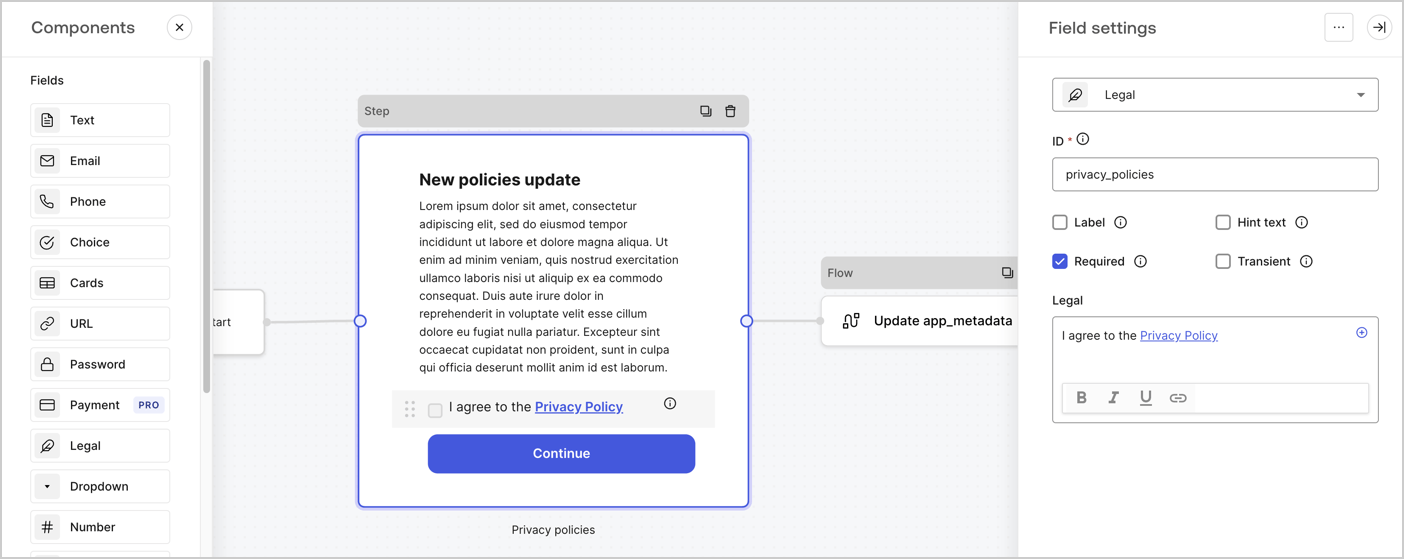
The Step node is the graphical interface visible to users. Add [Fields](/docs/customize/forms/nodes-and-components) to the Step node to collect the new agreement acceptance value by following these steps:

1. Drag a **Rich text** field from the **Components menu** into the **Step** node.

   * **Rich text**: Enter a description of your privacy policies updates.
   * Select **Save**.
2. Drag a **Legal** field into the **Step** node.

   * **ID**: Enter `privacy_policies`.
   * **Required**: Enable the checkbox.
   * **Legal**: Enter `I agree to the Privacy Policy`.
   * Select **Save**.
3. Select **Publish** to save.
<Frame>
  <img src="https://mintcdn.com/docs-staging-feat-docs-5540/P7jqD3P9N4QhUzdZ/docs/images/cdy7uua7fh8z/59zFFjQjAnjogkc2QGIqqJ/0ad66b1b636544122aa4e65968b76c2c/privacy-policy-step-node.png?fit=max&auto=format&n=P7jqD3P9N4QhUzdZ&q=85&s=fa4b46a9e0a1396b1cb858d6cfb66172" alt="Dashboard > Actions > Forms > Use case privacy policy step node" data-og-width="1404" width="1404" data-og-height="559" height="559" data-path="docs/images/cdy7uua7fh8z/59zFFjQjAnjogkc2QGIqqJ/0ad66b1b636544122aa4e65968b76c2c/privacy-policy-step-node.png" data-optimize="true" data-opv="3" srcset="https://mintcdn.com/docs-staging-feat-docs-5540/P7jqD3P9N4QhUzdZ/docs/images/cdy7uua7fh8z/59zFFjQjAnjogkc2QGIqqJ/0ad66b1b636544122aa4e65968b76c2c/privacy-policy-step-node.png?w=280&fit=max&auto=format&n=P7jqD3P9N4QhUzdZ&q=85&s=a23e83ab93399cc62cb1852529925f73 280w, https://mintcdn.com/docs-staging-feat-docs-5540/P7jqD3P9N4QhUzdZ/docs/images/cdy7uua7fh8z/59zFFjQjAnjogkc2QGIqqJ/0ad66b1b636544122aa4e65968b76c2c/privacy-policy-step-node.png?w=560&fit=max&auto=format&n=P7jqD3P9N4QhUzdZ&q=85&s=54242e047b1a2d12b2c985f6a0637db5 560w, https://mintcdn.com/docs-staging-feat-docs-5540/P7jqD3P9N4QhUzdZ/docs/images/cdy7uua7fh8z/59zFFjQjAnjogkc2QGIqqJ/0ad66b1b636544122aa4e65968b76c2c/privacy-policy-step-node.png?w=840&fit=max&auto=format&n=P7jqD3P9N4QhUzdZ&q=85&s=a4aa82d4c03e6ac6209ed6d3ea273e5b 840w, https://mintcdn.com/docs-staging-feat-docs-5540/P7jqD3P9N4QhUzdZ/docs/images/cdy7uua7fh8z/59zFFjQjAnjogkc2QGIqqJ/0ad66b1b636544122aa4e65968b76c2c/privacy-policy-step-node.png?w=1100&fit=max&auto=format&n=P7jqD3P9N4QhUzdZ&q=85&s=023c8e26a8f8c42af27a736789bf8c16 1100w, https://mintcdn.com/docs-staging-feat-docs-5540/P7jqD3P9N4QhUzdZ/docs/images/cdy7uua7fh8z/59zFFjQjAnjogkc2QGIqqJ/0ad66b1b636544122aa4e65968b76c2c/privacy-policy-step-node.png?w=1650&fit=max&auto=format&n=P7jqD3P9N4QhUzdZ&q=85&s=0bc484b643007e65779f939b741eda37 1650w, https://mintcdn.com/docs-staging-feat-docs-5540/P7jqD3P9N4QhUzdZ/docs/images/cdy7uua7fh8z/59zFFjQjAnjogkc2QGIqqJ/0ad66b1b636544122aa4e65968b76c2c/privacy-policy-step-node.png?w=2500&fit=max&auto=format&n=P7jqD3P9N4QhUzdZ&q=85&s=162936b00bdcc5041b35c6d78e8b1705 2500w" />
</Frame>

### Configure the Flow node

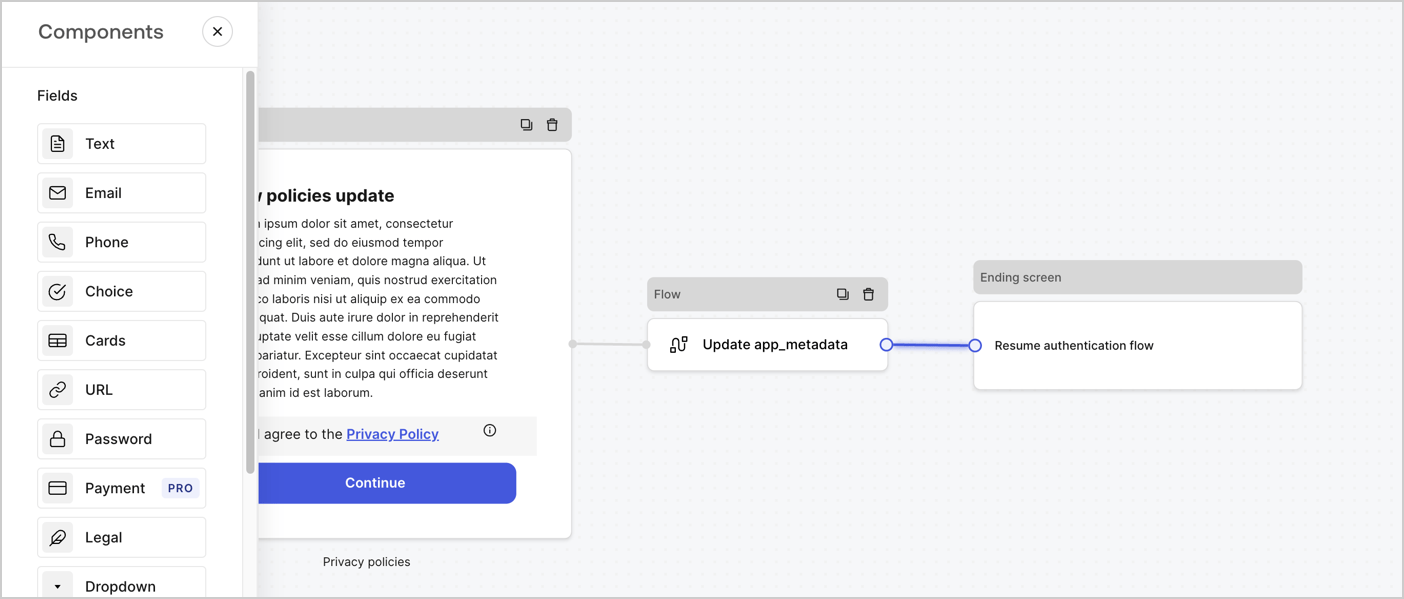
Add a **Flow** node after the **Step** node to update the `app_metadata` and resume the authentication flow by following these steps:

1. Select **Flow** from the bottom of the Form editor.
2. Remove the existing link between the **Step** and **Ending Screen** nodes.
3. Select the new **Flow** > **Click to add a flow** > **Create a new flow.**

   * Enter `Update app_metadata` in the **Name** field.
   * Select **Create**.
   * Select **Save**.
4. Link the **Flow** node to the **Step** and **Ending Screen** nodes as pictured below.
5. Select **Publish** to save.
<Frame>
  <img src="https://mintcdn.com/docs-staging-feat-docs-5540/oQyORW-_D7zcVjVj/docs/images/cdy7uua7fh8z/6YIkzm7SrpM9LW76AXuRzh/353c518fe82bbaa440836da1d83596d6/link-policies.png?fit=max&auto=format&n=oQyORW-_D7zcVjVj&q=85&s=f9fa1dc5e27860733de058de7674cab9" alt="Dashboard > Actions > Forms > Form" data-og-width="1404" width="1404" data-og-height="599" height="599" data-path="docs/images/cdy7uua7fh8z/6YIkzm7SrpM9LW76AXuRzh/353c518fe82bbaa440836da1d83596d6/link-policies.png" data-optimize="true" data-opv="3" srcset="https://mintcdn.com/docs-staging-feat-docs-5540/oQyORW-_D7zcVjVj/docs/images/cdy7uua7fh8z/6YIkzm7SrpM9LW76AXuRzh/353c518fe82bbaa440836da1d83596d6/link-policies.png?w=280&fit=max&auto=format&n=oQyORW-_D7zcVjVj&q=85&s=957dd05608dc6fc893b3dc041f51a3a6 280w, https://mintcdn.com/docs-staging-feat-docs-5540/oQyORW-_D7zcVjVj/docs/images/cdy7uua7fh8z/6YIkzm7SrpM9LW76AXuRzh/353c518fe82bbaa440836da1d83596d6/link-policies.png?w=560&fit=max&auto=format&n=oQyORW-_D7zcVjVj&q=85&s=3a3df42316dc454eb5f3f25e61aa44be 560w, https://mintcdn.com/docs-staging-feat-docs-5540/oQyORW-_D7zcVjVj/docs/images/cdy7uua7fh8z/6YIkzm7SrpM9LW76AXuRzh/353c518fe82bbaa440836da1d83596d6/link-policies.png?w=840&fit=max&auto=format&n=oQyORW-_D7zcVjVj&q=85&s=ba03fa9511bf0e334702c077f948f32e 840w, https://mintcdn.com/docs-staging-feat-docs-5540/oQyORW-_D7zcVjVj/docs/images/cdy7uua7fh8z/6YIkzm7SrpM9LW76AXuRzh/353c518fe82bbaa440836da1d83596d6/link-policies.png?w=1100&fit=max&auto=format&n=oQyORW-_D7zcVjVj&q=85&s=bfcde6e0afdc88c7654d08afcc9ee879 1100w, https://mintcdn.com/docs-staging-feat-docs-5540/oQyORW-_D7zcVjVj/docs/images/cdy7uua7fh8z/6YIkzm7SrpM9LW76AXuRzh/353c518fe82bbaa440836da1d83596d6/link-policies.png?w=1650&fit=max&auto=format&n=oQyORW-_D7zcVjVj&q=85&s=a7a5123f0fd3c7563e0f168da953be0f 1650w, https://mintcdn.com/docs-staging-feat-docs-5540/oQyORW-_D7zcVjVj/docs/images/cdy7uua7fh8z/6YIkzm7SrpM9LW76AXuRzh/353c518fe82bbaa440836da1d83596d6/link-policies.png?w=2500&fit=max&auto=format&n=oQyORW-_D7zcVjVj&q=85&s=31b24c95c8558ab8de184003502e2b20 2500w" />
</Frame>

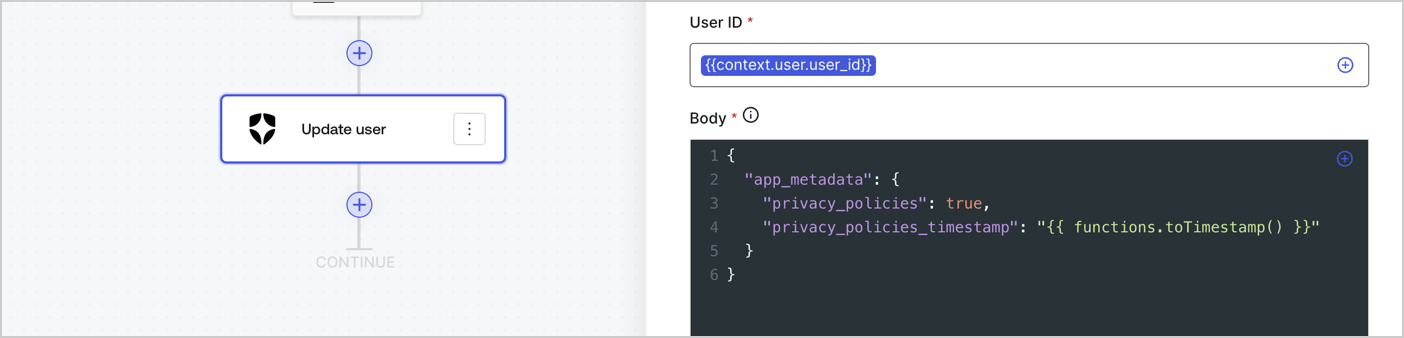
Add an Auth0 Update user action to the flow by following these steps:

1. Select the **Flow** **Update app\_metadata** > **Edit flow** to open the Flow editor in a new tab.
2. Below the StartAction, select the **+** icon to add an **Update user** action. Complete the fields below, then select **Save** to continue.

   * **Connection**: Select from the dropdown the Vault connection to your M2M application.

   * **User ID**: Enter `{{context.user.user_id}}`.

   * **Body**: Copy and paste the following code to update the app\_metadata with the privacy\_policies and privacy\_policies\_timestamp properties.

     ```text lines theme={null}
     {
       "app_metadata": {
         "privacy_policies": true,
         "privacy_policies_timestamp": "{{ functions.toTimestamp() }}"
       }
     }
     ```

   * Select **Save**.
3. Select **Publish** to save.
<Frame>
  <img src="https://mintcdn.com/docs-staging-feat-docs-5540/zHQog2SZrzm0GgeX/docs/images/cdy7uua7fh8z/CvMNIwWrOUwaFW4X3G28p/1fb70ae57a20749d9ffaaba8dc0b7e26/update-user-privacy.png?fit=max&auto=format&n=zHQog2SZrzm0GgeX&q=85&s=094d0a41ea62d36559dfd17ac7676976" alt="Dashboard > Actions > Forms > User case privacy policy code" data-og-width="1404" width="1404" data-og-height="338" height="338" data-path="docs/images/cdy7uua7fh8z/CvMNIwWrOUwaFW4X3G28p/1fb70ae57a20749d9ffaaba8dc0b7e26/update-user-privacy.png" data-optimize="true" data-opv="3" srcset="https://mintcdn.com/docs-staging-feat-docs-5540/zHQog2SZrzm0GgeX/docs/images/cdy7uua7fh8z/CvMNIwWrOUwaFW4X3G28p/1fb70ae57a20749d9ffaaba8dc0b7e26/update-user-privacy.png?w=280&fit=max&auto=format&n=zHQog2SZrzm0GgeX&q=85&s=f09c829c4ab9f01a48e9be0ba4fd988a 280w, https://mintcdn.com/docs-staging-feat-docs-5540/zHQog2SZrzm0GgeX/docs/images/cdy7uua7fh8z/CvMNIwWrOUwaFW4X3G28p/1fb70ae57a20749d9ffaaba8dc0b7e26/update-user-privacy.png?w=560&fit=max&auto=format&n=zHQog2SZrzm0GgeX&q=85&s=b8f3ef68f1592a0bc8fecf0453240049 560w, https://mintcdn.com/docs-staging-feat-docs-5540/zHQog2SZrzm0GgeX/docs/images/cdy7uua7fh8z/CvMNIwWrOUwaFW4X3G28p/1fb70ae57a20749d9ffaaba8dc0b7e26/update-user-privacy.png?w=840&fit=max&auto=format&n=zHQog2SZrzm0GgeX&q=85&s=0d04c128a9a55c20b818ec0916054fc4 840w, https://mintcdn.com/docs-staging-feat-docs-5540/zHQog2SZrzm0GgeX/docs/images/cdy7uua7fh8z/CvMNIwWrOUwaFW4X3G28p/1fb70ae57a20749d9ffaaba8dc0b7e26/update-user-privacy.png?w=1100&fit=max&auto=format&n=zHQog2SZrzm0GgeX&q=85&s=2c54faa6af171245925c4ebc6a40a432 1100w, https://mintcdn.com/docs-staging-feat-docs-5540/zHQog2SZrzm0GgeX/docs/images/cdy7uua7fh8z/CvMNIwWrOUwaFW4X3G28p/1fb70ae57a20749d9ffaaba8dc0b7e26/update-user-privacy.png?w=1650&fit=max&auto=format&n=zHQog2SZrzm0GgeX&q=85&s=49b64dff48ad4263185ce59274c16686 1650w, https://mintcdn.com/docs-staging-feat-docs-5540/zHQog2SZrzm0GgeX/docs/images/cdy7uua7fh8z/CvMNIwWrOUwaFW4X3G28p/1fb70ae57a20749d9ffaaba8dc0b7e26/update-user-privacy.png?w=2500&fit=max&auto=format&n=zHQog2SZrzm0GgeX&q=85&s=0b60b9089fbbb8c53d12e1c54c2ecd69 2500w" />
</Frame>

<Callout icon="file-lines" color="#0EA5E9" iconType="regular">
  The flow **Update app\_metadata** adds a `privacy_policies true` value to the app`_metadata` object and also generates a timestamp with a [helper function.](/docs/customize/forms/variables)
</Callout>

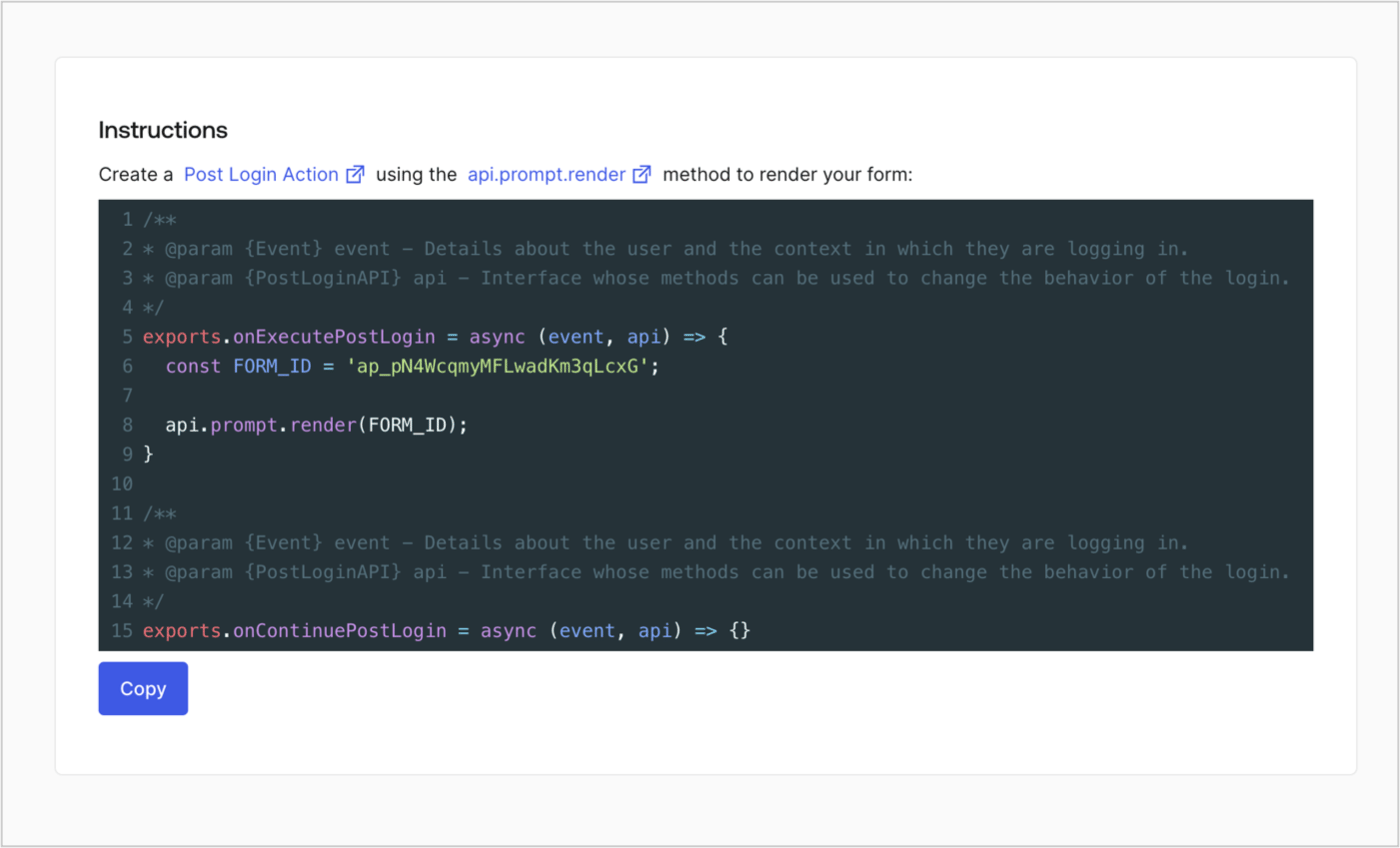
## Retrieve the form render code

Retrieve your form render code to visually render the form with a custom Post Login Action by following these steps:

* From the Form editor, select **`<> Render`**.
* Select **Copy**.
<Frame>
  <img src="https://mintcdn.com/docs-staging-feat-docs-5540/0240cnlwDtmarDUC/docs/images/cdy7uua7fh8z/2EIUzc539sq9lwoTKbjoJv/496a864c0fc44a782c9cadca119dbfb0/embed.png?fit=max&auto=format&n=0240cnlwDtmarDUC&q=85&s=fa22e8ecc9cc0599b499bf377c05a454" alt="Dashboard > Actions > Forms > Form > Embed" data-og-width="1400" width="1400" data-og-height="848" height="848" data-path="docs/images/cdy7uua7fh8z/2EIUzc539sq9lwoTKbjoJv/496a864c0fc44a782c9cadca119dbfb0/embed.png" data-optimize="true" data-opv="3" srcset="https://mintcdn.com/docs-staging-feat-docs-5540/0240cnlwDtmarDUC/docs/images/cdy7uua7fh8z/2EIUzc539sq9lwoTKbjoJv/496a864c0fc44a782c9cadca119dbfb0/embed.png?w=280&fit=max&auto=format&n=0240cnlwDtmarDUC&q=85&s=052f177353243bdb21eec4a31283bf18 280w, https://mintcdn.com/docs-staging-feat-docs-5540/0240cnlwDtmarDUC/docs/images/cdy7uua7fh8z/2EIUzc539sq9lwoTKbjoJv/496a864c0fc44a782c9cadca119dbfb0/embed.png?w=560&fit=max&auto=format&n=0240cnlwDtmarDUC&q=85&s=606928c07c58937aec63db413c2e60e2 560w, https://mintcdn.com/docs-staging-feat-docs-5540/0240cnlwDtmarDUC/docs/images/cdy7uua7fh8z/2EIUzc539sq9lwoTKbjoJv/496a864c0fc44a782c9cadca119dbfb0/embed.png?w=840&fit=max&auto=format&n=0240cnlwDtmarDUC&q=85&s=ef976b16b4e00e11b31ee569dc2024f9 840w, https://mintcdn.com/docs-staging-feat-docs-5540/0240cnlwDtmarDUC/docs/images/cdy7uua7fh8z/2EIUzc539sq9lwoTKbjoJv/496a864c0fc44a782c9cadca119dbfb0/embed.png?w=1100&fit=max&auto=format&n=0240cnlwDtmarDUC&q=85&s=c25d97c13b8abea4c120a9c1405acf03 1100w, https://mintcdn.com/docs-staging-feat-docs-5540/0240cnlwDtmarDUC/docs/images/cdy7uua7fh8z/2EIUzc539sq9lwoTKbjoJv/496a864c0fc44a782c9cadca119dbfb0/embed.png?w=1650&fit=max&auto=format&n=0240cnlwDtmarDUC&q=85&s=b3bf28e89c43d88248b2f61d44aab5cd 1650w, https://mintcdn.com/docs-staging-feat-docs-5540/0240cnlwDtmarDUC/docs/images/cdy7uua7fh8z/2EIUzc539sq9lwoTKbjoJv/496a864c0fc44a782c9cadca119dbfb0/embed.png?w=2500&fit=max&auto=format&n=0240cnlwDtmarDUC&q=85&s=9eedc805f3f7905c0fcd84a615521f9e 2500w" />
</Frame>

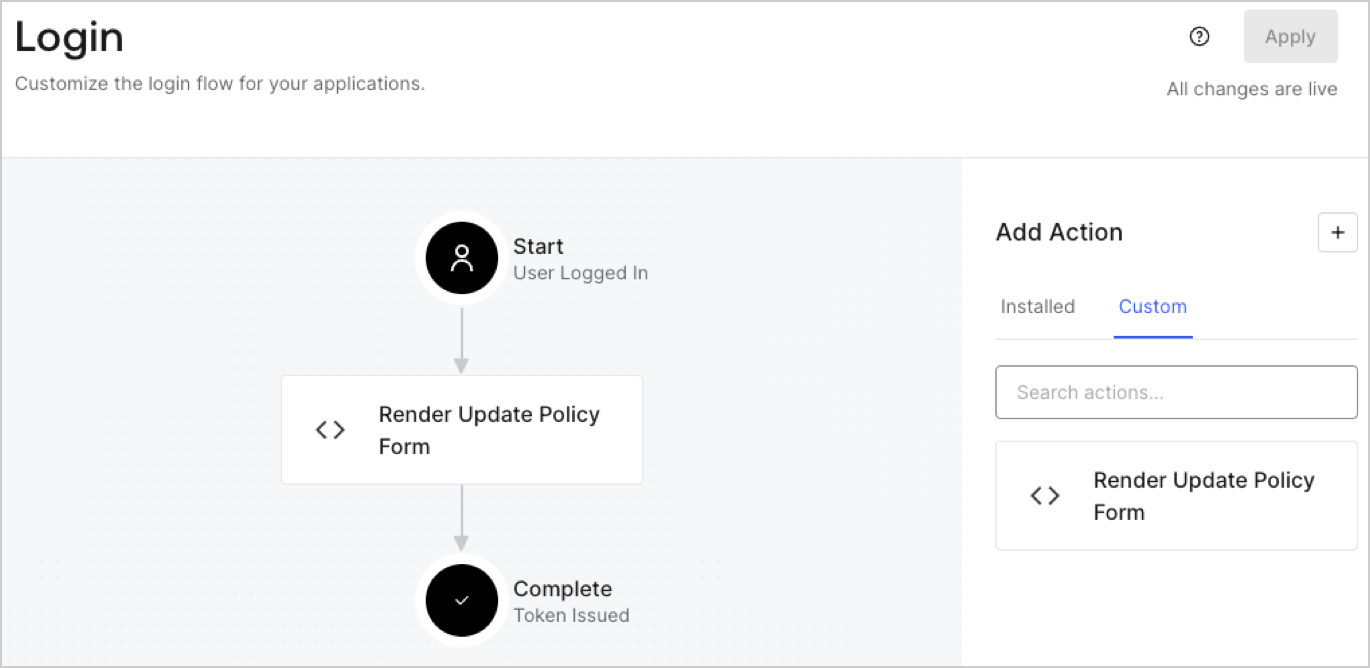
## Create a Post Login Action

Create a post-login Action to render your form by following these steps:

1. Navigate to **Auth0 Dashboard > Actions > Flows > Login.**
2. Select the **+** icon and Select **Build from scratch**:

   * **Name**: Enter `Render Update Policy Form`.
   * **Trigger**: Select `Login / Post Login`.
   * **Runtime**: Select the recommended version.
3. Select **Create**.

To configure the post-login Action:

1. Delete the existing code from the Code editor.
2. Paste the form render code into the Code editor.
3. Edit the code to define the conditional logic that will render the form.

   ```javascript lines theme={null}
   /**
   * @param {Event} event - Details about the user and the context in which they are logging in.
   * @param {PostLoginAPI} api - Interface whose methods can be used to change the behavior of the login.
   */
   exports.onExecutePostLogin = async (event, api) => {
     const FORM_ID = 'REPLACE_WITH_YOUR_FORM_ID';

     if (event.user.app_metadata.privacy_policies !== true) {
       api.prompt.render(FORM_ID);
     }
   }

   exports.onContinuePostLogin = async (event, api) => { }
   ```

   <Callout icon="file-lines" color="#0EA5E9" iconType="regular">
     The example code above will render the form when a user is missing the app metadata `privacy_policies` property.
   </Callout>
4. Select **Deploy.**
5. Drag and Drop the **Render Update Policy Form** Action to the **Login** flow.
   <Frame>
     <img src="https://mintcdn.com/docs-staging-feat-docs-5540/oBJwpsOgifyO2zsZ/docs/images/cdy7uua7fh8z/5TOwDgevZsBqd7yZynUYWU/41ca909dc3007aed4f40ff794a05efa5/postlogin.png?fit=max&auto=format&n=oBJwpsOgifyO2zsZ&q=85&s=b810420b0f66f374733facedc2e61b04" alt="Dashboard > Forms > Use Case > Render update policy form login action" data-og-width="1370" width="1370" data-og-height="668" height="668" data-path="docs/images/cdy7uua7fh8z/5TOwDgevZsBqd7yZynUYWU/41ca909dc3007aed4f40ff794a05efa5/postlogin.png" data-optimize="true" data-opv="3" srcset="https://mintcdn.com/docs-staging-feat-docs-5540/oBJwpsOgifyO2zsZ/docs/images/cdy7uua7fh8z/5TOwDgevZsBqd7yZynUYWU/41ca909dc3007aed4f40ff794a05efa5/postlogin.png?w=280&fit=max&auto=format&n=oBJwpsOgifyO2zsZ&q=85&s=40af42e486c5efd8f3c97cc1a7851a65 280w, https://mintcdn.com/docs-staging-feat-docs-5540/oBJwpsOgifyO2zsZ/docs/images/cdy7uua7fh8z/5TOwDgevZsBqd7yZynUYWU/41ca909dc3007aed4f40ff794a05efa5/postlogin.png?w=560&fit=max&auto=format&n=oBJwpsOgifyO2zsZ&q=85&s=6300b4448bc8808487b704989f13d368 560w, https://mintcdn.com/docs-staging-feat-docs-5540/oBJwpsOgifyO2zsZ/docs/images/cdy7uua7fh8z/5TOwDgevZsBqd7yZynUYWU/41ca909dc3007aed4f40ff794a05efa5/postlogin.png?w=840&fit=max&auto=format&n=oBJwpsOgifyO2zsZ&q=85&s=45609c78767438af749636e891ade872 840w, https://mintcdn.com/docs-staging-feat-docs-5540/oBJwpsOgifyO2zsZ/docs/images/cdy7uua7fh8z/5TOwDgevZsBqd7yZynUYWU/41ca909dc3007aed4f40ff794a05efa5/postlogin.png?w=1100&fit=max&auto=format&n=oBJwpsOgifyO2zsZ&q=85&s=46c76c57bccc7c08044f19cb32f81032 1100w, https://mintcdn.com/docs-staging-feat-docs-5540/oBJwpsOgifyO2zsZ/docs/images/cdy7uua7fh8z/5TOwDgevZsBqd7yZynUYWU/41ca909dc3007aed4f40ff794a05efa5/postlogin.png?w=1650&fit=max&auto=format&n=oBJwpsOgifyO2zsZ&q=85&s=1e620420a076f549deab9a6fff1093c1 1650w, https://mintcdn.com/docs-staging-feat-docs-5540/oBJwpsOgifyO2zsZ/docs/images/cdy7uua7fh8z/5TOwDgevZsBqd7yZynUYWU/41ca909dc3007aed4f40ff794a05efa5/postlogin.png?w=2500&fit=max&auto=format&n=oBJwpsOgifyO2zsZ&q=85&s=d46896ba313c692592e8b3de38cfa6bc 2500w" />
   </Frame>
6. Select **Apply.**

### Test implementation

Test the implementation by following these steps:

1. Log in with an existing user whose app`_metadata` attribute `privacy_policies` does not have a value.
2. The post-login Action in the Login flow will render the form and prompt for acceptance.
3. Select **Auth0 Dashboard > User Management > Users,** locate the user and verify that the `app_metadata` attribute `privacy_policies` contains a `true` value and a timestamp.
